> ## Documentation Index
> Fetch the complete documentation index at: https://docs.uplink.build/llms.txt
> Use this file to discover all available pages before exploring further.
# Core Concepts
> Understanding the key concepts of Uplink's mobile automation platform
Uplink's architecture revolves around four core concepts: **Clients**, **Devices** (Workers), **Browsers**, and **Pages**. Understanding how these components work together is essential for effective automation.
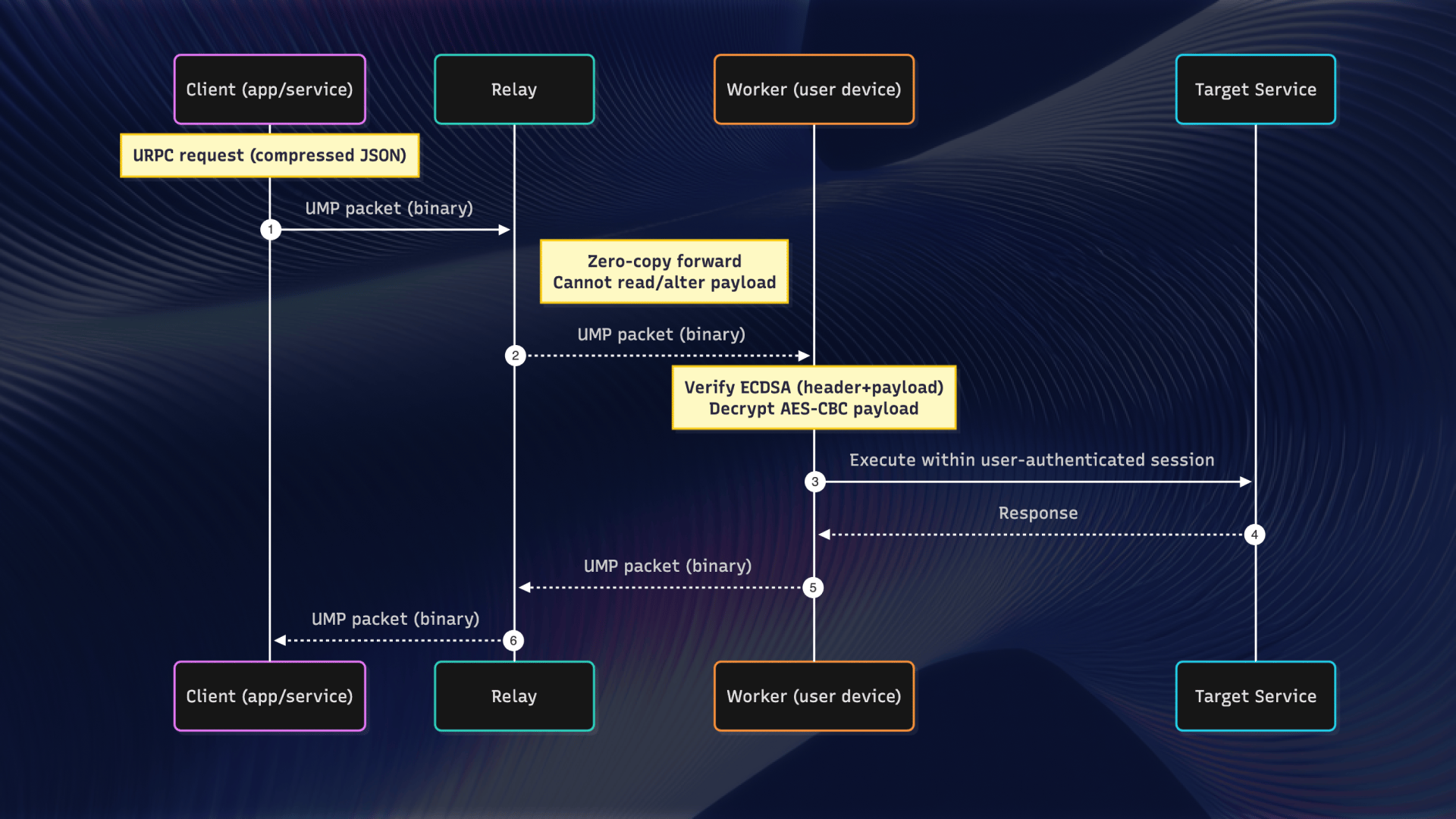
## Architecture overview
 ## Client
The **Client** is your main entry point for Uplink automation. It manages the WebSocket connection to the Uplink relay server and provides methods for launching browsers and managing devices.
```typescript theme={null}
import uplink from '@uplink-code/uplink'
const session = await uplink.session('', {
include: { ecdsa: true, ecdh: true }
})
const client = await uplink.client.fromSession(session)
```
**Key responsibilities:**
* Maintaining the WebSocket connection to the session
* Managing device connections
* Launching and connecting to browsers
* Emitting device connection events
A single Client can manage multiple devices simultaneously, making it easy to run parallel automation across different mobile devices.
## Devices (Workers)
A **Device** (also called a **Worker**) represents a physical mobile device connected to your session. Each device can host multiple browser instances.
```typescript theme={null}
// Get all connected workers
const workers = client.workers()
// Or listen for workers as they connect
client.on('worker-connected', (worker) => {
console.log('Worker connected:', worker.address)
})
// Get device information from a worker
const worker = workers[0]
const info = await worker.getDeviceInfo()
// { deviceModel, platform, platformVersion, deviceType }
```
**Device characteristics:**
* Each device has a unique address for identification
* Devices can be iOS or Android
* Multiple browsers can run on a single device
* Devices connect through either the SDK or Connect app
### Device lifecycle events
```typescript theme={null}
client.on('worker-connected', (device) => {
console.log('New device:', device.address)
})
client.on('worker-disconnected', (device) => {
console.log('Device disconnected:', device.address)
})
```
## Browsers
A **Browser** represents a browser instance running on a device. Each browser can have multiple pages (tabs) open simultaneously.
```typescript theme={null}
// Launch a new browser
const browser = await client.launch()
// Or launch on a specific device
const browser = await device.launch()
// Connect to an existing browser
const browser = await client.connect('browser-handle')
// List all browsers on a device
const browsers = await client.browsers()
```
**Browser characteristics:**
* Each browser runs in its own isolated context
* Browsers persist until explicitly closed
* You can reconnect to browsers by their handle
* Multiple browsers can run on the same device
## Pages
A **Page** represents a browser tab or window. This is where most of your automation happens—navigation, interaction, JavaScript execution, and more.
```typescript theme={null}
// Create a new page
const page = await browser.newPage()
// Navigate and interact
await page.goto('https://example.com')
await page.click('#button')
const title = await page.evaluate(() => document.title)
// List all pages in a browser
const pages = await browser.pages()
```
**Page characteristics:**
* Pages are isolated from each other
* Each page has its own JavaScript context
* Pages can be shown/hidden independently
* Event listeners can be attached to monitor page activity
## Hierarchy and relationships
The hierarchy of Uplink components:
```
Client
└─ Device (Worker)
└─ Browser
└─ Page
```
**Navigation rules:**
* You can access browsers from either the Client or Device level
* Pages are always accessed through their parent Browser
* Device connections are managed at the Client level
## Sessions
A **Session** is the authenticated connection that ties everything together. Sessions are created programmatically using your API key and provide the communication channel between your code and the devices.
```typescript theme={null}
// Session creation
const session = await uplink.session('', {
include: { ecdsa: true, ecdh: true }
})
```
**Session properties:**
* Created using API keys from your Uplink Console
* Scoped to specific projects for organization
* Multiple devices can connect to a single session
* Sessions persist until the client connection is closed
## Common patterns
### Single device automation
```typescript theme={null}
const session = await uplink.session('', {
include: { ecdsa: true, ecdh: true }
})
const client = await uplink.client.fromSession(session)
const browser = await client.launch() // Uses first available device
const page = await browser.newPage()
await page.goto('https://example.com')
```
### Multi-device automation
```typescript theme={null}
const session = await uplink.session('', {
include: { ecdsa: true, ecdh: true }
})
const client = await uplink.client.fromSession(session)
client.on('worker-connected', async (device) => {
const browser = await device.launch()
const page = await browser.newPage()
await page.goto('https://example.com')
})
```
### Managing multiple pages
```typescript theme={null}
const browser = await client.launch()
const page1 = await browser.newPage()
const page2 = await browser.newPage()
await page1.goto('https://example.com')
await page2.goto('https://google.com')
// Switch between pages
await page1.show() // Bring to foreground
await page2.show() // Switch to page2
```
## Next steps
Learn about session management
Managing multiple devices
Explore page automation methods
Full Client API reference
## Client
The **Client** is your main entry point for Uplink automation. It manages the WebSocket connection to the Uplink relay server and provides methods for launching browsers and managing devices.
```typescript theme={null}
import uplink from '@uplink-code/uplink'
const session = await uplink.session('', {
include: { ecdsa: true, ecdh: true }
})
const client = await uplink.client.fromSession(session)
```
**Key responsibilities:**
* Maintaining the WebSocket connection to the session
* Managing device connections
* Launching and connecting to browsers
* Emitting device connection events
A single Client can manage multiple devices simultaneously, making it easy to run parallel automation across different mobile devices.
## Devices (Workers)
A **Device** (also called a **Worker**) represents a physical mobile device connected to your session. Each device can host multiple browser instances.
```typescript theme={null}
// Get all connected workers
const workers = client.workers()
// Or listen for workers as they connect
client.on('worker-connected', (worker) => {
console.log('Worker connected:', worker.address)
})
// Get device information from a worker
const worker = workers[0]
const info = await worker.getDeviceInfo()
// { deviceModel, platform, platformVersion, deviceType }
```
**Device characteristics:**
* Each device has a unique address for identification
* Devices can be iOS or Android
* Multiple browsers can run on a single device
* Devices connect through either the SDK or Connect app
### Device lifecycle events
```typescript theme={null}
client.on('worker-connected', (device) => {
console.log('New device:', device.address)
})
client.on('worker-disconnected', (device) => {
console.log('Device disconnected:', device.address)
})
```
## Browsers
A **Browser** represents a browser instance running on a device. Each browser can have multiple pages (tabs) open simultaneously.
```typescript theme={null}
// Launch a new browser
const browser = await client.launch()
// Or launch on a specific device
const browser = await device.launch()
// Connect to an existing browser
const browser = await client.connect('browser-handle')
// List all browsers on a device
const browsers = await client.browsers()
```
**Browser characteristics:**
* Each browser runs in its own isolated context
* Browsers persist until explicitly closed
* You can reconnect to browsers by their handle
* Multiple browsers can run on the same device
## Pages
A **Page** represents a browser tab or window. This is where most of your automation happens—navigation, interaction, JavaScript execution, and more.
```typescript theme={null}
// Create a new page
const page = await browser.newPage()
// Navigate and interact
await page.goto('https://example.com')
await page.click('#button')
const title = await page.evaluate(() => document.title)
// List all pages in a browser
const pages = await browser.pages()
```
**Page characteristics:**
* Pages are isolated from each other
* Each page has its own JavaScript context
* Pages can be shown/hidden independently
* Event listeners can be attached to monitor page activity
## Hierarchy and relationships
The hierarchy of Uplink components:
```
Client
└─ Device (Worker)
└─ Browser
└─ Page
```
**Navigation rules:**
* You can access browsers from either the Client or Device level
* Pages are always accessed through their parent Browser
* Device connections are managed at the Client level
## Sessions
A **Session** is the authenticated connection that ties everything together. Sessions are created programmatically using your API key and provide the communication channel between your code and the devices.
```typescript theme={null}
// Session creation
const session = await uplink.session('', {
include: { ecdsa: true, ecdh: true }
})
```
**Session properties:**
* Created using API keys from your Uplink Console
* Scoped to specific projects for organization
* Multiple devices can connect to a single session
* Sessions persist until the client connection is closed
## Common patterns
### Single device automation
```typescript theme={null}
const session = await uplink.session('', {
include: { ecdsa: true, ecdh: true }
})
const client = await uplink.client.fromSession(session)
const browser = await client.launch() // Uses first available device
const page = await browser.newPage()
await page.goto('https://example.com')
```
### Multi-device automation
```typescript theme={null}
const session = await uplink.session('', {
include: { ecdsa: true, ecdh: true }
})
const client = await uplink.client.fromSession(session)
client.on('worker-connected', async (device) => {
const browser = await device.launch()
const page = await browser.newPage()
await page.goto('https://example.com')
})
```
### Managing multiple pages
```typescript theme={null}
const browser = await client.launch()
const page1 = await browser.newPage()
const page2 = await browser.newPage()
await page1.goto('https://example.com')
await page2.goto('https://google.com')
// Switch between pages
await page1.show() // Bring to foreground
await page2.show() // Switch to page2
```
## Next steps
Learn about session management
Managing multiple devices
Explore page automation methods
Full Client API reference